Publishing and access
Publishing puts a version of the content into circulation for learners; access decides who gets in and under what conditions. These two decisions live separately from the editorial body — and publishing is kind-agnostic: courses and materials publish the same way. A course's publish feeds its public page; a material's publish is what lets the parent courses render it.
How publishing works
Every piece of content is a single row in the database, edited in place. It holds two documents:
| Document | Role |
|---|---|
content | The editable draft — what the team sees in the editor. |
publishedContent | The snapshot the learner reads — a copy of content, written by Publish. |
While you edit, the learner sees nothing new. When you Publish, Cursiva copies the current draft into publishedContent, stamps publishedAt, and recomputes the facts derived from publishing (the reference edges and the stable sectionIds). Before the first publish, publishedContent is null: the content exists, but no one can read it or enroll. This holds for both kinds — an unpublished material renders as an inert card in the courses that reference it, and only its publish makes those modules readable.
What Publish does, step by step
- Verifies that you have edit rights in the content domain.
- Recomputes the reference edges from the document being published.
- Under a per-organization advisory lock (held until the transaction commits), writes the snapshot, the publication date, the valid edges, and the
sectionIds.
The per-organization lock serializes simultaneous publishes within the same organization. Without it, two pieces of content publishing at the same time could each pass the cycle check against the other's previous state and, on write, form a cycle. Under the lock, the second publish only proceeds after the first has committed its edges.
Rules applied to references on publish
The reference graph is computed over the published content. When publishing, Cursiva keeps only the edges whose target is safe and makes them inert otherwise:
| Edge dropped | Reason |
|---|---|
| Target in another organization | Prevents bypassing the paywall by reading another organization's paid/unlisted content for free. |
| Target with no published version | Avoids an inert card that would make the course permanently uncompletable. |
| Deleted target | The target no longer exists. |
| Reference that would create a cycle | Keeps the graph a DAG within the organization. |
| Self-reference (to itself) | Removed before the other checks. |
A dropped edge does not break the page: the referenced module's card appears inert, with no link, instead of taking the learner to a 404.
Visibility: listed vs. unlisted
Publishing makes a course readable by link — a material has no public page at all: it has no slug, and learners only reach it inside a course that references it, at URLs owned by that course. Discovery is a further decision, for courses only, controlled by the Listed field — which appears only once the course has a price, because the marketplace is paid-only.
| State | In the catalog | By direct link | Typical use |
|---|---|---|---|
| Published and listed | Yes — appears in the marketplace and the organization's catalog | Yes | A priced course, sold in the marketplace. |
| Published and unlisted | Does not appear as a card | Yes | A free course (link-only), or a priced offer sold by link only. |
The public catalog lists only content that is published AND listed, newest to oldest. Because the marketplace is paid-only, free courses are always unlisted — reachable by direct link, never shown on Explore or in a catalog. A module that only exists inside a course is a material — it has no slug, no direct link and no price at all, and is reached only through a parent course's edge slugs. Only a course reused as a module can stay unlisted while remaining purchasable by direct link when it has a price.
Toggling visibility sits on the boundary between catalog and finance: both the content role and the finance role can turn it on or off.
The access rule
Access is a property of the course enrollment, not of a purchase row and not of the edges between pieces of content. Course composition is bundling: the parent is what gets enrolled; monetization is not a concern of each edge.
The core rule is short: only an active learner reads the course body; everyone else sees the sales preview. Free changes how the learner becomes active, not the access predicate.
| Access scenario | What the learner sees |
|---|---|
| Free course, not enrolled | The sales preview, with the first section available as a sample. One-click enrollment unlocks the course. |
| Free content, enrolled | The full body, with progress, drip release, and course navigation. |
| Priced course, no active learner | The sales preview: header, marketing preamble, and the module cards. A purchase awaiting fulfillment or approval does not reveal sections. |
| Priced course, active learner | The full body under the learner's progress and release rules. |
| Free child course of a paid parent | Its own public page shows its free-course preview. Inside a parent where the person is actively enrolled, it opens as part of that root enrollment. A child that is a material has no page or offer of its own and is reached only through the enrolled parent. |
| Module of a course you are enrolled in | The nested course view, under the single root enrollment, respecting drip release. |
| Refunded / delinquent enrollment | No access — the row is kept for history and reactivation, but grants no reading. |
The sales preview
Without an active learner, Cursiva assembles the public sales view: the header, the preamble (marketing content before the first step), and the module cards stay visible, so the curriculum shows up. Section content is withheld — it belongs to the course. A free course may reveal its first section as a sample. When something has been withheld, the preview is marked as gated and an enrollment prompt invites the visitor in.
Sample: free child course of a paid parent
Because access follows active enrollment, a free course referenced by a paid course shows its own free-course preview when visited directly. This keeps it useful as a sample without making purchase a second permission system. A visitor who lands on a module segment under a course they are not enrolled in is taken to the child's canonical course page; a material has no canonical public page.
Composition = bundling
Referencing content assembles a course from existing pieces. Enrollment happens once, at the root (the sellable unit): there is no separate sign-up per sub-content, at any nesting depth. The learner navigates continuously through the tree under that single enrollment. Access to any module reachable through the root's published tree follows from the root enrollment — never from buying each module in isolation.
Drip release: drip and prerequisites
Within a course, each step has a release rule. The rule lives on the edge (owned by the parent document), so the same child content is paced independently in each course. Two mechanics combine:
- Drip (time delay) — releases the step after an interval. The delay is measured in hours (
afterHours) and counts from an anchor. - Prerequisites — explicit dependencies: the step only opens when the required steps are completed.
Drip anchors
| Anchor | Counts from |
|---|---|
enroll (default) | The learner's enrollment date. |
prev | The completion of the immediately preceding step in the path ("after the last section"). |
A step anchored on prev whose predecessor is not yet completed has no anchor — it stays locked, and the timer only starts when the predecessor is completed.
For an offer with deliveryMode: "cohort", drip anchors on the learner's cohort start, not the enrollment date — the whole cohort is released together. self_paced offers use enrollment as the anchor.
How sections and modules differ
The availability evaluator applies per-step-type semantics:
| Step type | Release rule |
|---|---|
| Section (title/heading) | Prerequisites. requires: null defaults to the immediately preceding step (sequential); [] = always open; [ids] = all listed ones completed. |
| Module (reference) | The edge's rule: drip (afterHours, anchored on enroll or prev) plus explicit prerequisites. A module is never locked by mere order in the document. |
A prerequisite id that no longer exists in the content is treated as satisfied (fail-open), so a removed or stale target never locks the learner out forever. Prerequisites are kept acyclic: the "Unlocks after" selector in the editor refuses a choice that would create a cycle.
What the learner perceives
Each step of the path carries a state: available (the rule was satisfied), locked, the lock reason (drip or prerequisite) and, for drip, the unlockAt instant when it opens. The reader delivers only the released steps — the content of locked steps is never sent to the client, so there is no "reading ahead." Steps locked by drip show a live countdown until unlock.
The kind ceremony: promote and demote
A course's public page and its offers exist because it is a course; a material has neither. Moving between the two kinds is an explicit ceremony, on the content's Advanced tab:
- Promote to course — a material gains a public handle and its default Standard offer (free, unlisted), and from that moment sells and enrolls like any course.
- Turn into material — the reverse: the course's offers are deleted and its slug is released. The demotion is refused while the course has learners, sales, any enrollment-request history, or any campaign targeting its offers. Historical decisions are retained, so a course that has taken requests should be unlisted and kept as a course. After demotion, the material keeps no archived offers either.
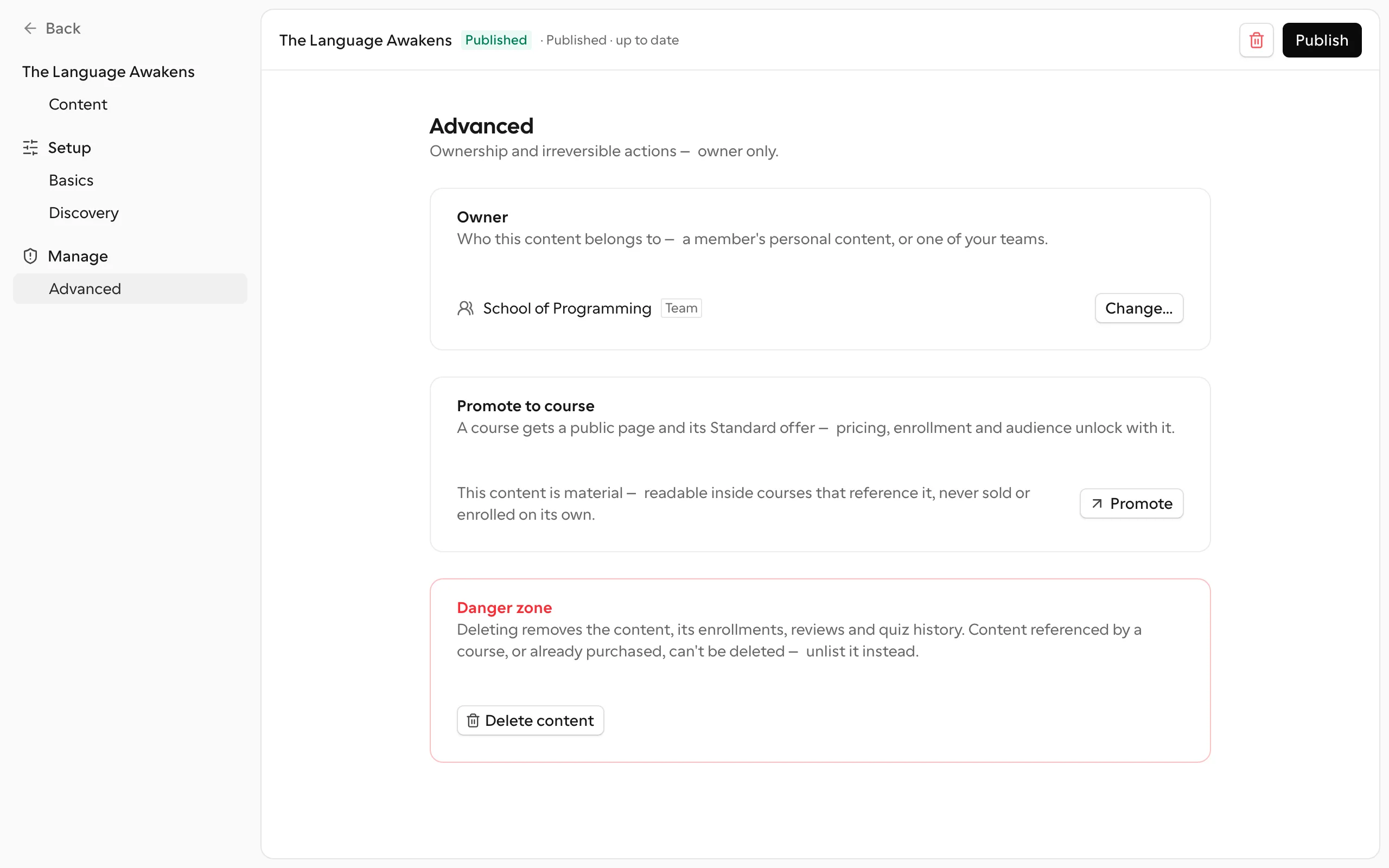
Related guardrail: archiving a course's last active offer is refused — a course always keeps one active offer. The way to stop selling entirely is the demotion, never an offer-less course.
Enrollment, approval, and seats
Every course is born with an offer, so a published course is always enrollable — the way in depends on the offer's configuration:
- Free, open entry — the learner enrolls directly (answering the intake form, if there is one).
- Free, with approval — self-signup is closed: people request to join and the team approves. Each request carries the intake answers and becomes an enrollment once approved.
- Priced — the learner pays first and lands in the queue (when there is approval); a rejection refunds automatically. Buyers skip the intake by definition — the payment is the form.
- Seat limit — when set, the page shows the remaining seats Cal-style ("3 seats left") before the click, and new enrollments are serialized so they never oversell the limit.
Enrollment is idempotent within the same offer: enrolling again returns the existing row. Each learner has one enrollment per course and it must store the chosen offer; while active or past due, another offer, request, or checkout for the same course is refused. A refunded or delinquent enrollment keeps the row (for history and reactivation on re-payment), but grants no access while it is not active.
Sharing and embedding
Once published, a course's canonical link (/{organization}/{course}) is what you share — it is the course's one public URL, doubling as its sales page. Materials have no link of their own to share. It generates rich link cards (title, description, and cover) when pasted into WhatsApp, LinkedIn, or X — that unfurl is the creator's ad. Unlisted content stays link-only and gets noindex.
Module links stay within the main course's URL space (/{organization}/{course}/{segment}), preserving the continuity of enrollment and navigation at any depth. The Embed setting offers a way to present the content in another context; see the settings page for the embedding details.